
Vagabond Studio
Create with Claude
Manu's little guide to making your own business cards, flyers, brochures, catalogues and websites, just by describing what you want.
October 2026
Welcome
Hi dearest ones,
Welcome to my little guide on how to use Claude to create any sort of digital material: logos, business cards, flyers, brochures, catalogues or even websites.

Contents
Part 1: How to do it all by yourself
Part 2: How to do it even quicker and cheaper
Part 1: How to do it all by yourself
Claude Cowork
I work in Claude Cowork rather than the normal Claude chat. The difference: in Cowork, Claude doesn't just talk with you, it DOES things for you. It can work with the files and folders on your computer, for example sort your photos or turn a price list into a nice table. Once you connect them, it can also tidy up your Google Drive, read your emails and draft replies. It can research on the web for you, and even fill out forms on websites. And much more.
All of this is amazing in itself, and it can certainly be used when you create brochures or websites. For example, you can ask Claude to research the websites of similar businesses and take inspiration from them, ask it what really makes a good start page, or look up knowledge specific to your business and write your website's texts from it.
But for brochures and flyers, the real magic is something else: Claude can create artifacts.
Artifacts: where the magic happens
An artifact is a finished piece of work that Claude makes next to the conversation instead of inside it: a poster, a page of text, a chart, even a little app. It opens in its own panel on the side, where you can look at it, keep changing it with Claude, download it or share it.
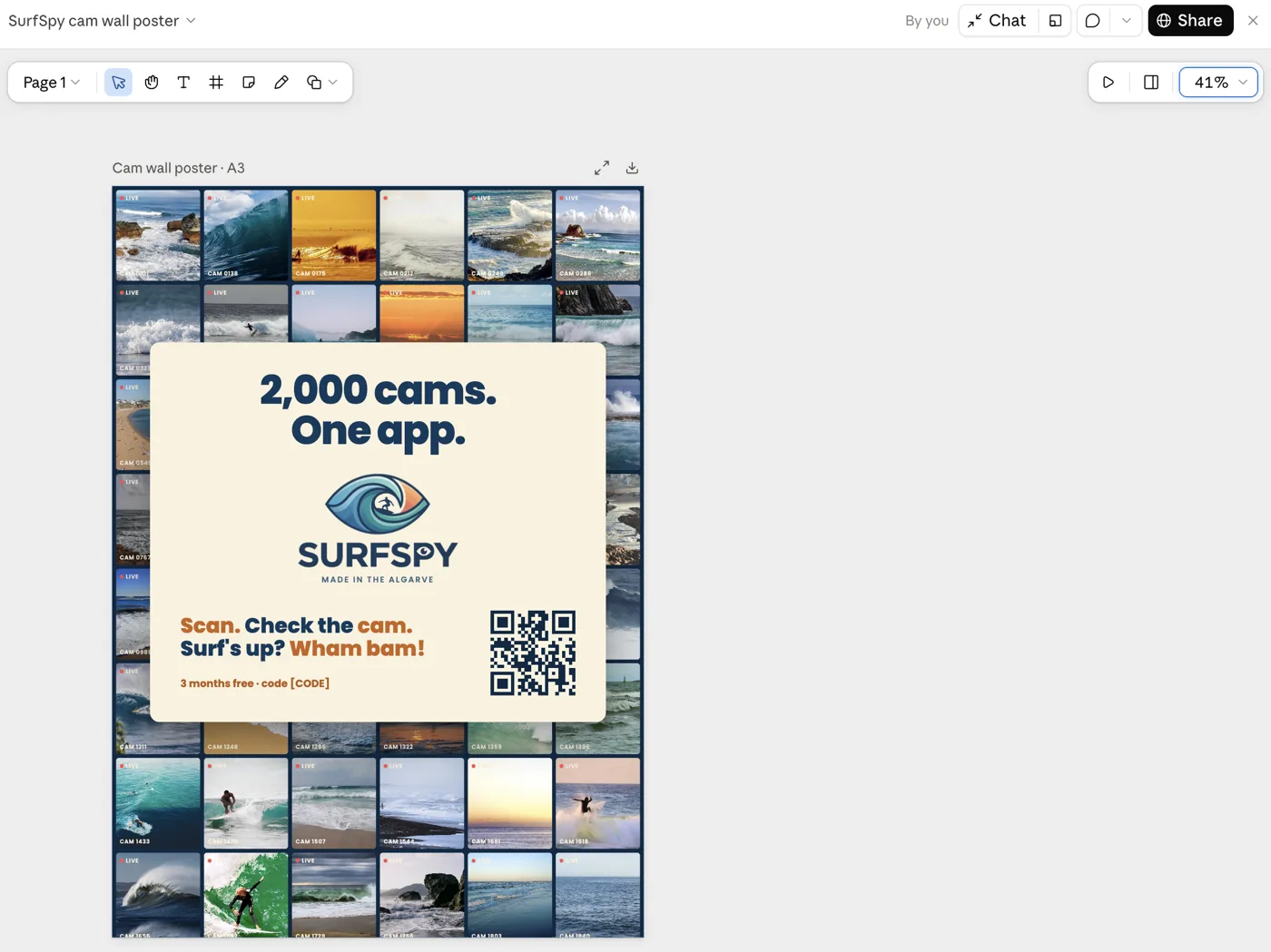
The artifacts I make for posters, flyers and brochures are written in HTML. HTML is the language every web page is written in: plain text with labels that tell the browser "this is a heading", "this is a picture", "this is a button". Its partner is CSS, the instructions for how everything looks: fonts, colours, sizes and layout. Your browser reads both and shows you the finished page. You never have to read or write any of it yourself: Claude writes it, and you only ever see the result.
The great thing is that you can open the artifact in the side panel and comment on anything: the overall design, the content, but also single letters, words, paragraphs, images, icons and so on. Then you simply tell Claude: "move this up", "change the colour of that to a warmer accent", "rephrase this to say exactly this" or "give me 5 ideas for how we could phrase this differently".
So when I want to create, say, a poster, I either already have an idea about the content and design, or I brainstorm together with Claude. If I'm really not sure, I ask Claude to show me 5 poster designs that are widely different in content and design, just to see what I like. From there I pick what I like best and create one "master" poster. Then I get to work and fine-tune it until I'm really happy: changing colours, moving things around, adding or removing images, and so on.
You can then keep it as a single web page (in fact, the artifact already IS a web page), save it as a PDF and/or print it.
Here is exactly how it works, in a short video:
From pages to a website
Websites are really nothing more than a collection of pages created like this with Claude, plus buttons to press, forms to fill in, or other interactive things such as calculators.
To make a website public, though, you need a few more things. I describe them here as if you work with your own Claude on your own computer, the way I do. (On this helper website you need fewer of them; more about that on page 12.)
1) A folder on your computer that holds everything your website is made of: the pages themselves, one shared file for the look (fonts, colours and spacing), your pictures, logo and fonts, the content such as texts and prices, small programs (scripts in the browser and functions on the server, for example for a contact form), the rules for Claude in a file called CLAUDE.md, and a few settings files for building and publishing your site.
2) A cloud storage called GitHub, so that when you change a page or an element on a page, you don't just have the current version but a time machine of all earlier versions. This way you can always go back to an older version if you want to. It is also your backup: if your computer breaks, everything is still there.
3) A server such as Cloudflare that hosts your website. A server is a computer that is switched on day and night and connected to the internet, so that anyone, anywhere, can open your website at any time. Your own computer can't do that: it sleeps, and it isn't built for many visitors at once. Cloudflare has servers all over the world, so your website opens quickly wherever your visitor is. Every time you save a new version to GitHub, Cloudflare picks it up and puts it online by itself.
4) A domain where your website lives, such as Kani's designoftilia.com. In fact, it's best to have two addresses, so that your changes don't go live the moment you make them:
A developer site, which only you can see, where you change things back and forth until you're happy. When you want your creation to go live, you press "Publish".
A live site, open to the public, where what you publish appears.
How to actually create the website
Just as you create your posters, catalogues and so on! You tell Claude what you want, and it creates the page and saves it in the folder on your computer. Then it saves a new version to GitHub, and a minute later you can admire it on your developer site, where no one else can see it yet.
You COULD then tell Claude what to change, just as with your brochures: move this, make this larger, change this image, give me an idea for a text here. What you don't have, though, is the direct comment function you get when an artifact is shown in the Claude app.
And I find that the most useful way to work. So when I created my own website, I simply told Claude: on my developer site, please add a comment function so I can comment on any element, just as in the artifact. Claude created it for me, and we fine-tuned it until I was happy. So just as we create ANY element of our brochures or websites, we can create and design features like this too.
With the comment function, I first comment on everything on my website. When I'm done, I go back to Claude and say: "I have added some comments, please read them and make the changes." Or, if I first want to know how Claude intends to change things, I say: "First tell me your plan." If I like it, I approve; if not, I adjust it. Claude then makes all the changes and saves a new version. I can do this as often as I want until I'm completely happy. Then I publish, and the site goes live on my live domain.
That's it! Simple as that.
In short
Quick summary
For brochures, flyers, posters and so on, you only need Claude. Ask it to create an artifact showing your creation and comment on it until you're happy. Then save it as a PDF, print it, or keep it as a single web page.
A website is simply a collection of such pages shown publicly on the web, with buttons to press, forms to fill in or other interactive things. For this you need a folder on your computer, GitHub as your cloud storage and time machine, Cloudflare to host your website, and two addresses: one for your developer site (your work in progress) and one for your live site.
And a few more things, if you're curious.
Read this if you're interested. You don't need it to get started.
A few more technical bits
- DNS is the address book of the internet. When someone types designoftilia.com, DNS tells their browser which server to ask for the website. "Connecting a domain" really means writing your website's server into that address book. So this is part of point 4.
- The padlock (HTTPS) makes the connection between your visitor and your website private and safe. Browsers warn visitors about sites without it. Cloudflare sets it up automatically and for free.
- The sitemap is a list of all the pages of your website, written for Google and other search engines so they find every page. Claude creates it along with your pages, so it lives in your folder (point 1) and you never have to think about it.
- Email on your domain (like hello@designoftilia.com) is a separate thing from the website: a domain doesn't come with email by itself. Cloudflare can forward such addresses to your normal inbox for free. To also send from that address, you need an email service, often offered by the place where you buy the domain.
- The legal bits: as soon as your website collects anything about visitors (a contact form, statistics), you need a short privacy policy, and statistics that use cookies need your visitor's consent first. Claude can write these with you, but have someone who knows check them.
Why GitHub, Cloudflare and Astro
- GitHub is the most widely used home for code in the world, and Claude knows it inside out. The free plan has no limit on private storage spaces (they are called "repositories"). Everything you save there belongs to you, with the full history, and you can take it anywhere: to another host, to another helper, or to Claude on your own computer.
- Cloudflare hosts websites like yours for free, with generous limits: on the free plan up to 100,000 visits a day to the little server programs (like the contact form), up to 100 domains per website, and visits to the pages themselves are free and unlimited. It also gives you the padlock, the DNS address book and the server functions in one place, and it sells domains at cost price.
- Astro is a free tool that assembles bigger websites: you write each shared part only once (the menu, the footer, a price list), and Astro turns everything into plain, fast pages that Google reads easily. My own website vagabondhaven.com is built with it. On this helper website we start simpler: plain pages with one shared style file, no assembling step, which is all a small website needs. When your website grows, Claude can move it to Astro for you.
Do I need a domain to start?
No, you don't need one to start. Cloudflare gives every website a free address of its own, for example design-of-tilia.yourname.workers.dev. That is perfect for your developer site, and you can even use it as your live site at first.
When you're ready, you either buy a domain or connect one you already have. There are many places that sell domains, for example Oderland, Loopia and one.com in Sweden, or GoDaddy, Namecheap and Porkbun internationally, and also Cloudflare itself.
Buying at Cloudflare has two advantages: it sells at cost price, without anything added on top (a .com is about 10 US dollars a year), and the domain is already in Cloudflare's address book, so connecting it to your website is a few clicks, with no DNS records to copy anywhere. The limits: Cloudflare doesn't sell every ending (.se, .eu and .de, for example, aren't available there), and a domain bought there always keeps its address book at Cloudflare.
Buying elsewhere works just as well. Then you tell the seller to use Cloudflare's address book (you copy two "nameserver" addresses from Cloudflare into the seller's settings, once). For .se or .eu you buy at a Swedish or European seller anyway: at Oderland, for example, a .se cost SEK 229 and a .eu SEK 139 for the first year in October 2026.
And free domains? I don't know of one I would recommend for a business. The cheapest offers are usually for the first year only, and renewing can cost far more, so always compare the price for the first year and for renewal. The free Cloudflare address is your free option, and you can add a real domain any time later.
What does it cost?
You might now wonder: what does all this cost? Do I need a Claude Pro or Max plan, and how much do GitHub, Cloudflare and the domains cost?
The cool thing is that GitHub and Cloudflare are free for websites like ours. Their free limits are far above what a small business website needs (the numbers are under "Why GitHub, Cloudflare and Astro" above).
For Claude itself you need a paid plan if you want to work the way I do, because Cowork is only included in the paid plans. The free plan does have artifacts, so you can try making a single page there. But it gives you only enough use for everyday questions, not for designing a brochure in many rounds, and it has no Cowork, so Claude can't work with the files on your computer.
- Free: everyday questions and artifacts, no Cowork.
- Pro: 20 US dollars a month (17 a month if you pay for a year), with Cowork and at least 5 times the use of Free. Enough to start.
- Max: from 100 US dollars a month, with 5 or 20 times the use of Pro, for people who work with Claude many hours a day.
Use is counted in rolling five-hour windows (plus a weekly limit on the paid plans), not as a fixed number of messages. Prices are as shown on Claude's website in October 2026; in kronor or euros, with VAT, they can differ.
Domains usually cost a little, roughly 100 to 250 kronor a year for the usual endings (see "Do I need a domain to start?" above).
Who can see your developer site?
Only you. Every Cloudflare address can in principle be opened by anyone who knows it, so your developer site is locked: it only opens through "My site" in the menu, which gives your browser a personal pass for 30 days. Anyone else who tries the address just sees a closed door. Your live site, on the other hand, is open to everyone, and shows only what you have published.
Part 2: How to do it even quicker and cheaper
What Vagabond Studio helps you with
Because setting up all these accounts and connecting them might feel like a challenge, I have made this little website to make it even easier for you.
It's cheaper, and you don't need your own Claude account
It gives you access to Claude through MY account, via the API. An API is like a direct phone line between two programs: instead of you typing to Claude in the Claude app, this website calls Claude directly and passes on what you write. What you use is paid from my account, by the amount actually used. So you don't need your own Claude plan to try it out here.
It guides you through the steps
It guides you through setting up your own space, as automatically as possible. Every step tells you exactly what happens, and how you could do it yourself instead, so nothing is a black box:
- No folder on your computer needed. Here, your folder lives in your GitHub, and Claude works on it there. You only need a folder on your computer if you later work with your own Claude, the way I described above.
- Your space at Cloudflare. You create a free Cloudflare account and press one button, "Deploy to Cloudflare". Cloudflare then makes a copy of my ready-made starter site in your GitHub (with the comment function and everything else already in it), puts it online at your free address, and from then on publishes every new version by itself. You already HAVE a GitHub account, because you used it to get into this website.
- Allow this website to save in your GitHub. One more click on GitHub: you allow the "Vagabond Studio App" to save files in that one new repository, and only there. You can take this permission back at any time in your GitHub settings.
- A domain, if you want one: you type a name, see which endings are still free, and get help buying and connecting it.
You get some useful features
On your developer site you will already find:
- a) the comment function I created,
- b) a design switcher I created: it lets you test and switch fonts and colours across your brochure or your entire website. Pick from a few suggestions or create your very own set,
- c) picture swapping without asking Claude: turn the comment function on, tap the picture, and choose a new one from your computer or phone, or drop it in,
- d) "Print" and "Save as PDF" buttons on every single page, and a "Publish" button for each creation.
Trying it out here
So if you just want to give it a try, use the chat on the start page. It is super simple: describe your idea, for example "I want to create a flyer for my jewellery business. I have no idea what it should look like. Research what other jewellery businesses do and then give me your ideas." Claude can search the web from here too. You then see your flyer on your developer site, under "My creations".
If you want to create a whole website, you use the very same chat box to tell Claude what you want.
One small thing: when you use Claude here, it runs on my account, and every conversation costs a little money. So that this isn't "blind", you can always see exactly how much you have used, at the top of the page and under Usage, and you get a little note in the chat every time another 5 € is reached. There is no limit, so create as much as you like! Whenever it suits you, you can pay me back. No rush at all.
Hugs,
Manu
Two quick setup steps, and then you can describe your first creation to Claude.

Let's get started!
Two quick setup steps, and then you can describe your first creation to Claude.
Vagabond Studio, by Vagabond Ventures AB.